






















Skip to content
Illustration showing independent contractors managing invoices on the Workstaff mobile app

Empower Your Staff to Submit Invoices

Workstaff empowers autonomous workers to create and submit invoices from the mobile app for the shifts they have worked on.

5-star customer rating illustration

SOME OF OUR VALUED CUSTOMERS

  • Montreal Alouettes
  • Celcius
  • Carnaval de Québec
  • Samajam
  • Modus Operandi Logistique
  • Roses de Montréal
  • Société Traiteur
  • Université Laval
  • Titan
  • Staff
  • Tango Tango
  • La Firme Evenementiel
  • Activation House
  • Olive Orange
  • BBW International
  • Rescousse Sante
  • SGM
  • PromoStaff
  • Stellar
  • Athena

INTEGRATED CONTRACTOR INVOICING

Staff Invoicing Has Never Been This Easy

Say goodbye to invoicing headaches with Workstaff's advanced system. Our software generates error-free invoices based on approved time-tracking data and customized remuneration conditions.

Staff-invoicing
Icon representing automated invoice reminders for staff

Invoices With Reminders

Say goodbye to late invoices from your staff

Icon illustrating automatic invoice generation from timesheets

Automatic Invoice Skeletons

From validated timesheets to invoices in seconds

Icon representing invoice reconciliation and validation

Hassle-Free Reconciliation and Validation

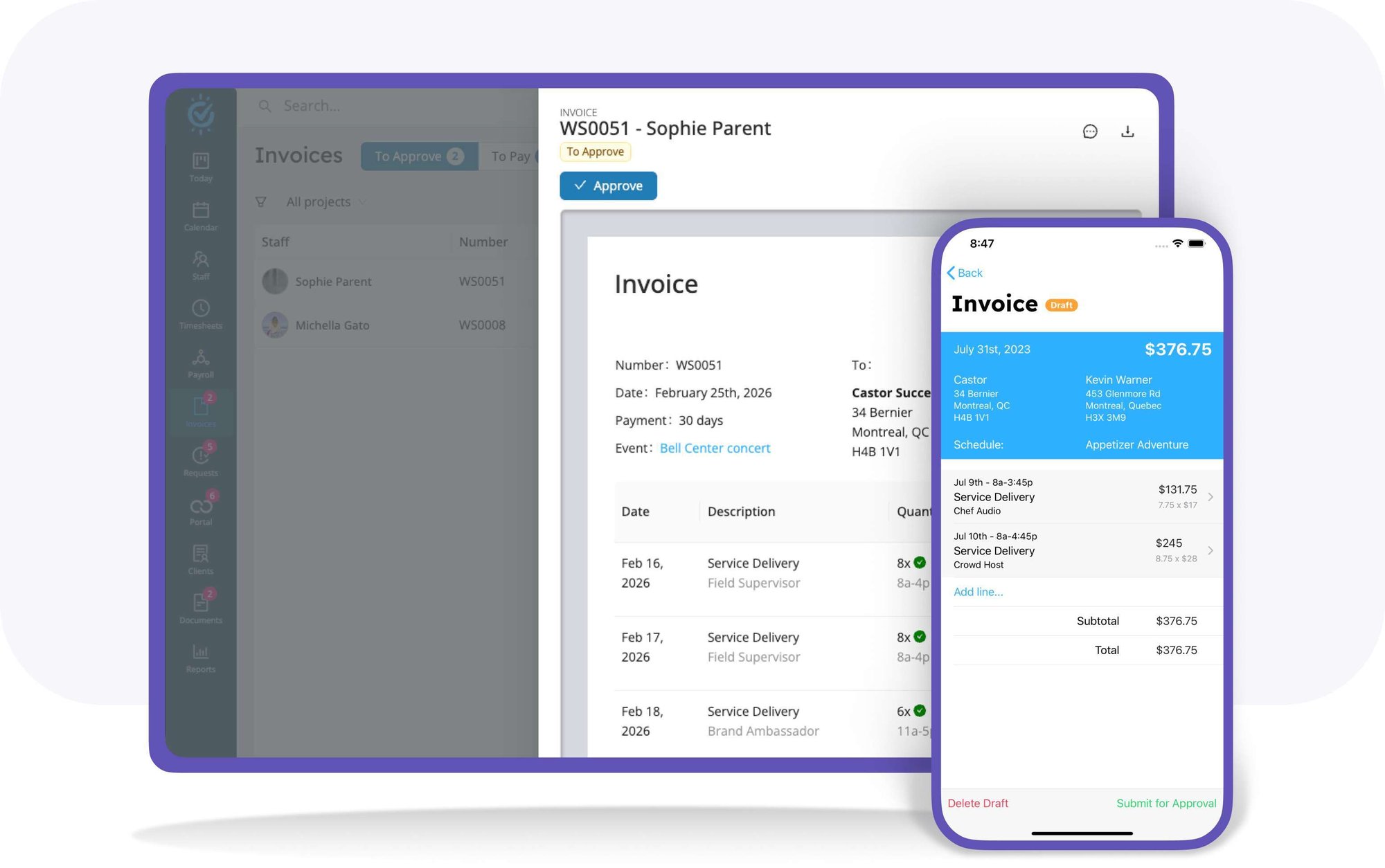
Workstaff cross-checks and validates all submitted invoices with actual time & remuneration data and highlights discrepancies


Illustration of a streamlined digital invoicing process on a mobile device

Effortlessly Handle Invoices

This streamlined process saves you and your contractors time and effort, while eliminating excessive back-and-forth communications. Enjoy the convenience and ease of our cutting-edge invoicing system today.
  • Easily review, reconcile and approve invoices
  • Verified invoice information
  • Smooth online invoice management
workstaff-logo

Why Use an Employee Invoicing System?

  • Quick booking
  • Timesheet management
  • Reminders and notifications
  • Instant messaging & broadcasts
  • Various clock in/out modes
  • Easy staff access to schedules and offers
  • Mobile app for workers and managers
  • Availability control
  • Reports exports

Frequently Asked Questions

What is the Contractor Invoices feature in Workstaff?

The Contractor Invoices feature empowers your self-employed and contractor staff to create and submit invoices directly from the mobile app for the shifts they have worked. This tool transforms a traditionally painful back-and-forth into a smooth, near-frictionless process.

How are invoices generated by the staff?

Invoices are automatically generated by Workstaff based strictly on approved time entries and the compensation conditions you provided in the system. This greatly limits the possibility of errors. The contractor also has the flexibility to add or change line items if needed before they hit Submit for approval.

How do managers process the submitted invoices?

Managers use a dedicated dashboard to handle these submissions. On your end, the platform allows you to effortlessly review, reconcile, and approve invoices submitted by your contractors, ensuring the billed amounts perfectly match the approved tracked time.

What criteria must be met for a shift to be invoiced?

For a shift to be invoiced, it must meet four specific criteria in Workstaff: the shift must be completed, it must be compensated (have earnings), a time entry must have been submitted and approved, and the employer must have declared the worker's employment status as Autonomous Worker / Contractor.