
























Skip to content
Illustration of advanced payroll controls including Excel exports and stub management

Payroll Made Easier & Faster

Streamline your remuneration process with Workstaff's advanced Payroll module. Effortlessly consolidate your staff's earnings and receive comprehensive reports ready to be seamlessly integrated into your external payroll software. Take the hassle out of payroll calculations and enjoy the convenience of accurate, ready-to-use numbers at your fingertips

5-star customer rating illustration

SOME OF OUR VALUED CUSTOMERS

  • La Firme Evenementiel
  • Celcius
  • Montreal Alouettes
  • BBW International
  • Carnaval de Québec
  • PromoStaff
  • Tango Tango
  • Société Traiteur
  • Athena
  • Université Laval
  • Staff
  • Samajam
  • Olive Orange
  • SGM

INTEGRATED PAYROLL DATA PROCESSING

Make Payroll a Breeze

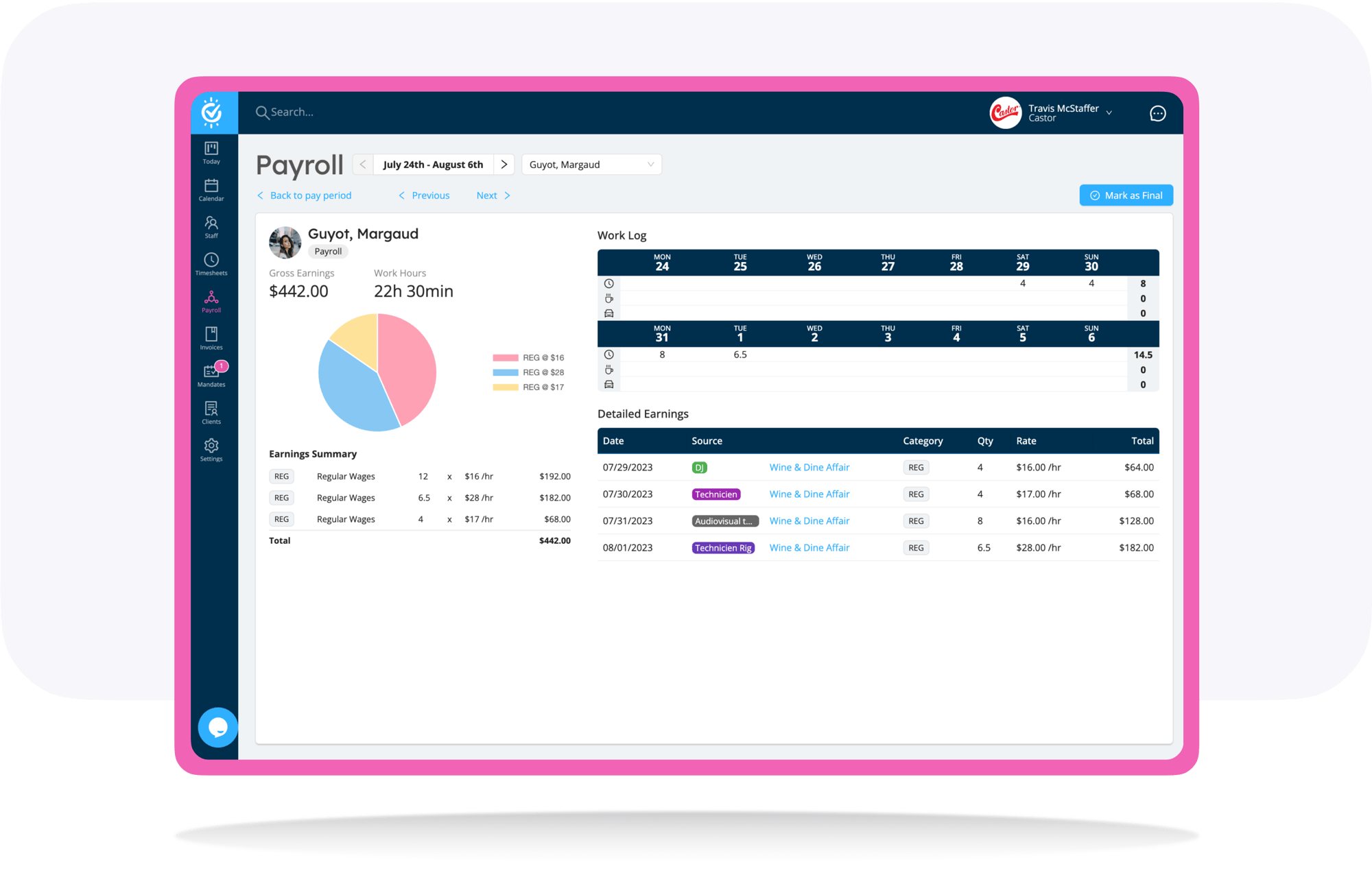
Simplify your pay period processing with Payroll, as it automatically compiles approved time entries and comprehensive remuneration details for workers assigned to shifts. Workstaff keeps you informed of any inconsistencies or missing data in your payruns, allowing you to take immediate action.

Workstaff payroll dashboard showing pay period processing and remuneration details
Icon representing calculations for overtime, premiums, and adjustments

Overtime, Premiums / Differentials & Adjustments

Workstaff's configurable remuneration engine calculates precise and detailed earnings data for your staff

Icon representing real-time notifications for payroll inconsistencies

Be Reactive

Identify inconsistencies and missing data in payruns with real-time notifications

Icon representing automatic updates and regeneration of pay run reports

Always Up To Date

Regenerate pay run reports reflecting adjustments made for accurate representation of payroll data

Illustration of advanced payroll controls including Excel exports and stub management

Elevate your payroll process

Maximize your payroll control with tailored pay period options, personalized staff selection, seamless stub management, and convenient Excel report exports.
  • Customizable pay period calendars
  • Select staff to include in pay runs
  • Easy stub searching, filtering and tracking
  • Export to Excel and Quickbooks
workstaff-logo

Has It All Planned

  • Quick booking
  • Timesheet management
  • Reminders and notifications
  • Instant messaging & broadcasts
  • Various clock in/out modes
  • Easy staff access to schedules and offers
  • Mobile app for workers and managers
  • Availability control
  • Reports exports

Frequently Asked Questions

What is the purpose of the Payroll module in Workstaff?

The Payroll module is designed to facilitate the preparation and processing of your organization's payroll. It automatically consolidates your workers' earnings, allowing you to prepare your payroll in minutes and eliminating the hassle of manual calculations.

How does the system calculate employee earnings?

Calculations are powered by Workstaff’s customizable compensation engine. This system automatically calculates overtime, premiums, and adjustments based strictly on the approved tracked hours, ensuring precise and accurate compensation every time.

What is a Payroll Period in Workstaff?

A Payroll Period is a frozen snapshot of your payroll data. When you Generate a payroll period, Workstaff takes a "picture" of all employees who had earnings during that cycle. If underlying time entries are adjusted later, the system notifies you of inconsistencies so you can manually Re-generate the period.

How do I manage and approve individual employee earnings?

Earnings are managed through Pay Stubs. Within the payroll period screen, each employee has a pay stub summarizing their earnings. Once you have reviewed and processed a stub, you can click the Mark as Final button. This locks the stub and tells Workstaff not to modify it anymore.

Does Workstaff directly pay my employees?

No, Workstaff acts as a payroll preparation system. The module is built to feed your external payroll provider or accounting software. Once your pay stubs are marked as final, you can use the ready-to-use Excel report export to transfer the exact, error-free data to your external system.

Explore More

contractors

Contractor Invoicing

Simplify invoice management.

Scheduling

Scheduling

Efficiently plan and schedule staff.

Communication-app

Communication

Centralize communications with your extended team.